Your Complete IRS Tax Transcript Resource Center
Learn how to pull your IRS transcripts, understand transaction codes and cycle dates, and use that information to track your refund, verify notices, and protect yourself from identity theft.
Always confirm your data using official IRS tools and your real IRS account transcript. This page shows you how to read what you see there.
Tax transcripts are more than a copy of your Form 1040. They are a running log of how the IRS is handling your account: what was filed, what changed, which notices were issued, and when refunds or balances posted.
Return Transcript vs. Account Transcript
The IRS offers multiple transcript types. For refund tracking and problem-solving, these two are most important:
- Return Transcript – Shows most line items from your original return, without later changes.
- Account Transcript – Shows your return plus a timeline of IRS actions: assessments, adjustments, credits, payments, and refund codes.
For understanding delays, notices, and refund movement, start with the Account Transcript.
Why Taxpayers Pull Account Transcripts
- Investigate refund delays when Where’s My Refund stops updating or bars disappear.
- See when notices (TC 971) were generated before they reach your mailbox.
- Confirm that amended returns and adjustments actually posted.
- Rebuild income and withholding records for old years (Wage & Income Transcript).
- Provide official records for lenders, FAFSA, and other financial reviews.
- Monitor for fraudulent filings or suspicious activity on your account.
Think of your transcript as the IRS audit trail for a tax year.
The fastest and most accurate method is through your IRS Online Account. Mailed copies are useful for records, but they will not show the most recent updates.
Step-by-Step: Get Transcript Online
- 1Visit Get Transcript on IRS.gov and choose to sign in or create an account.
- 2Verify your identity (SSN/ITIN, filing status, address, and financial account information such as a credit card, loan, or mortgage).
- 3Complete multi-factor authentication (for example, a text message security code) to access your online account.
- 4From the transcript menu, select the Account Transcript for the tax year you want to review and download or view it in your browser.
Online transcripts usually reflect updates within hours of posting to the IRS Master File.
Other Ways to Get Transcripts
- Get Transcript by Mail – Request a transcript online and have it mailed to your address of record (often 5–10 business days).
- Automated Phone – Call the IRS transcript line at 800-908-9946 to request transcripts by phone.
- Form 4506-T – Use this when a lender or third party needs transcripts sent directly to them.
These options are good for official records, but not ideal for real-time refund tracking.
Identity Verification & ID.me
Some taxpayers must verify their identity through ID.me to access online transcripts. This extra step helps protect your information from unauthorized access.
- Have a driver’s license, state ID, or passport ready for upload.
- You may need to take a live selfie using a smartphone or webcam.
- If online verification fails, live video calls and alternative options are available.
If you cannot verify online, you can still request transcripts by mail, or follow instructions from IRS identity verification letters (such as 5071C).
Best Practices When Accessing Transcripts
- Use a secure device and private internet connection whenever possible.
- Save PDF copies for your records, especially during active tax issues.
- Compare the transcript year to the tax year you are checking to avoid confusion.
- Watch for unfamiliar addresses or filings, which may signal identity theft.
Keeping your own copies makes it easier to compare changes over time.
Once you have your transcript, cycle codes and “As of” dates help you understand when the IRS processed your return and when you might see updates or a refund.
How to Decode the IRS Cycle Code
Your cycle code is an eight-digit number on the Account Transcript that shows the processing year, cycle week, and processing day. Example:
2025 0704 → Year 2025 · Week 07 · Day 04 (Wednesday)
- First four digits – Processing year (2025, for example).
- Next two digits – IRS cycle week of the year.
- Last two digits – Processing day of the week.
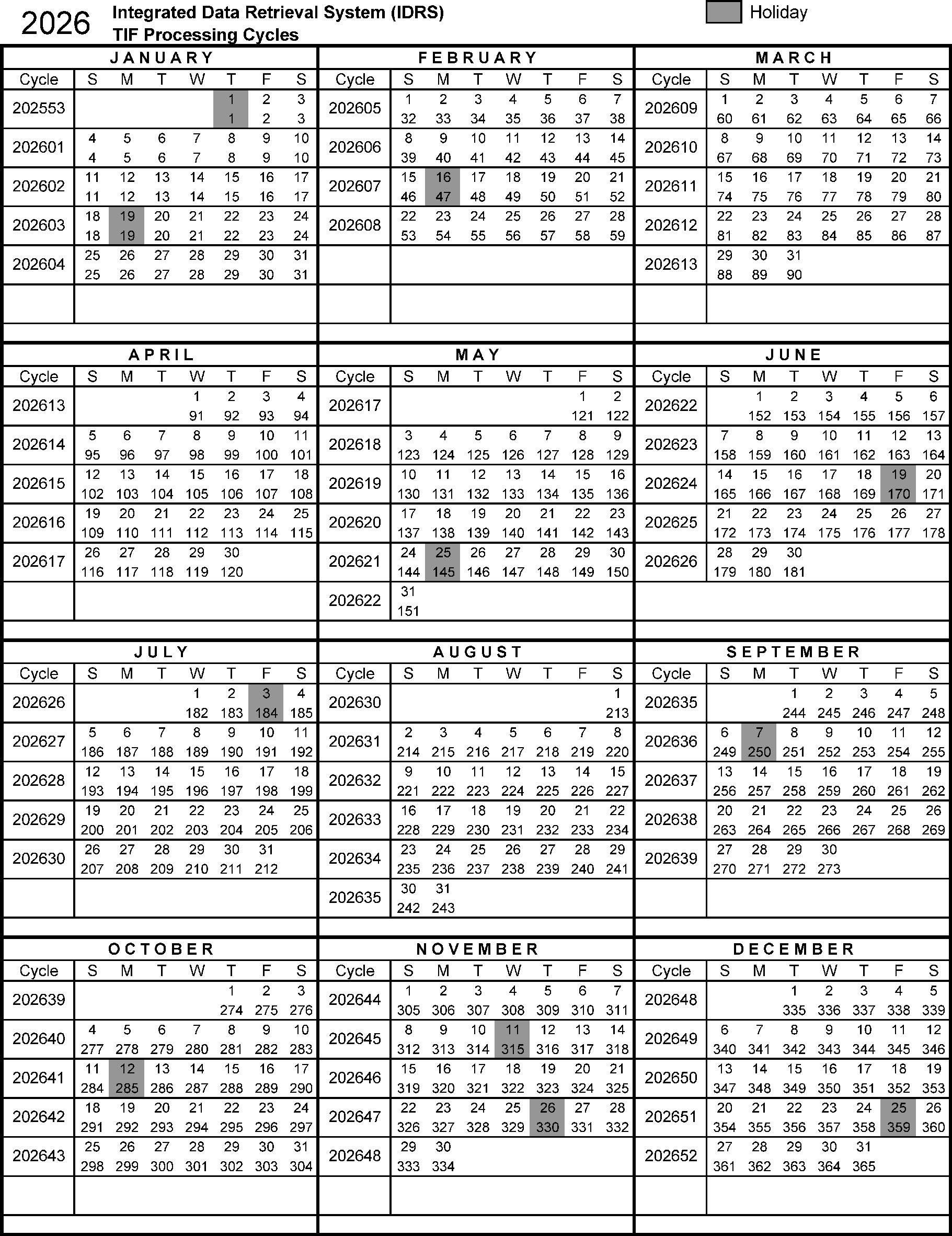
Use the cycle code with a calendar to translate it into an actual posting date. See our dedicated IRS Cycle Code guide for in-depth charts.
“As Of” Dates & Transcript Update Windows
The “As Of” date is the date the IRS uses to estimate interest, penalties, and your account balance or refund amount. It is a timing clue, not always a deposit date.
- Daily accounts can update multiple times per week, often in overnight cycles.
- Weekly accounts typically have one main refresh window each week.
- Many taxpayers see TC 846 on transcripts before Where’s My Refund switches to “Refund Approved.”
For typical update windows, use the Tax Refund Updates Calendar.
Transaction Codes (TCs) are three-digit numbers that describe actions the IRS has taken on your account. Understanding a handful of key codes makes transcripts much easier to read.
Filing & Withholding Codes
- TC 150 – Return filed and tax assessed.
- TC 806 – Withholding from Forms W-2 and 1099.
- TC 766 – Credit applied to your account.
- TC 768 – Earned Income Credit allowed.
Refund Movement Codes
- TC 846 – Refund issued/approved.
- TC 840 – Manual refund.
- TC 820 / 898 – Refund offset to IRS or other government debt.
- TC 836 – Refund applied to next-year estimated tax.
Codes That Need Attention
- TC 570 – Additional account action pending / credit hold.
- TC 971 – Notice or miscellaneous transaction (often letters).
- TC 420 / 424 – Examination indicators; return under review.
- TC 810 – Refund freeze; TC 811 – Freeze released.
This quick list is for education only. For a complete master list and detailed explanations, visit the IRS Tax Transcript Transaction Codes guide.
Here are answers to some of the most common questions taxpayers ask when reading their IRS transcripts and tracking their refunds.
Combine this resource page with RefundTalk’s hubs, calendars, and guides to get the clearest picture of your tax return status.
Tax Transcript Hub
A central starting point for everything transcript-related: how-to articles, glossary terms, visuals, and links to the most requested pages.
Transaction Code Directory
Plain-English explanations for IRS Transaction Codes, including what typically happens after TC 570, 846, 971, and others appear on your transcript.
IRS Processing Cycles & Calendars
Use RefundTalk’s cycle code resources and update calendars to connect IRS posting patterns with real-world direct deposit timelines.
If you see identity verification codes, refund freezes, or notices you don’t understand on your Account Transcript, use these resources to plan your next move.
This page is for general educational use and is not individualized tax advice. For guidance on your specific situation, contact the IRS directly or consult a qualified tax professional.
What is a Tax Transcript?
A tax transcript is an official IRS document that provides a record of your tax filings and any subsequent changes made to your return. Understanding the difference between transcript types is essential:
- Tax Return Transcript: A line-by-line summary of your original tax return as filed
- Account Transcript: A comprehensive record that includes your original return information plus any subsequent adjustments, amendments, or IRS actions
Account transcripts are particularly valuable because they reveal the complete history of your tax account, including:
- The date you filed your return
- Payment dates and amounts
- Additional taxes assessed
- Whether you filed the return yourself or if the IRS filed a substitute return on your behalf
- Penalties and interest charged or paid
- Refunds issued or credits applied
- Your current account balance with accruals
Account transcripts are available for any tax year that remains active in the IRS Master File system. While obtaining your transcript is straightforward, interpreting the transaction codes and entries can be challenging. This guide will help you decode your account transcript and understand exactly what’s happening with your tax account.
Regularly reviewing your tax transcripts allows you to monitor your account status, catch potential issues early, address problems proactively, and maintain accurate financial records. Staying informed about your tax account helps you avoid surprises and ensures you’re always aware of your current tax situation.
How to Obtain Your Tax Account Transcripts
The IRS offers several convenient methods to access your tax transcripts:
1. Online Access (Instant)
- Use the IRS Get Transcript Online tool for immediate access
- Requires identity verification by creating an IRS online account
- You’ll need:
- Email address
- Social Security Number (SSN) or Individual Taxpayer Identification Number (ITIN)
- Filing status and mailing address from your last return
- Financial account verification (credit card, mortgage, auto loan, or home equity loan account number)
2. By Mail (5-10 Business Days)
- Use Get Transcript by Mail to receive transcripts at your address of record
- Available for Tax Return and Tax Account Transcripts only
- No identity verification required beyond basic information
3. By Phone (Mail Delivery)
- Call the IRS at 800-908-9946
- Transcripts will be mailed to your address of record
4. Form 4506-T (Mail Delivery)
- Submit Form 4506-T to request transcripts by mail
- Ideal for third-party verification needs (lenders, financial institutions, etc.)
Setting Up Get Transcript Online
First-Time Users:
- Enter your name and email address to receive a confirmation code
- Enter the emailed confirmation code
- Provide your SSN, date of birth, filing status, and address from your most recent tax return
- Verify your identity using financial account information (last 8 digits of a credit card, car loan, mortgage, or home equity loan)
- Enter your mobile phone number to receive a six-digit activation code via text
- Enter the activation code
- Create your username, password, site phrase, and select a security image
Returning Users (First Login After Security Update):
- Log in with your existing username and password
- Verify your identity with financial account information
- Provide a mobile phone number for the activation code
- Enter the activation code you receive via text
Returning Users (Security Update Complete):
- Log in with your username and password
- Enter the security code sent to your registered mobile phone
- Access your transcripts
Cannot Verify Your Identity Online?
If you’re unable to complete the online verification process—whether due to lack of financial account information or no access to a mobile phone—you can still use Get Transcript by Mail. Simply request your transcript online or by calling 800-908-9946, and it will be mailed to your address of record within 5-10 business days.
- Amount of estimated payments
- The penalty paid/assessed
- Interest paid/assessed
- Interest paid to the taxpayer by the Service
- Balance due with accruals
Obtaining a copy of your IRS transcript is relatively easy, but understanding the codes listed on the transcript can prove more difficult. Here we will show you how you can use your Account Transcript to help you get a better understanding of what is going on with your tax account.
, .
The Best Way to Check Updates on your Transcripts is to obtain & view your IRS Transcripts Online
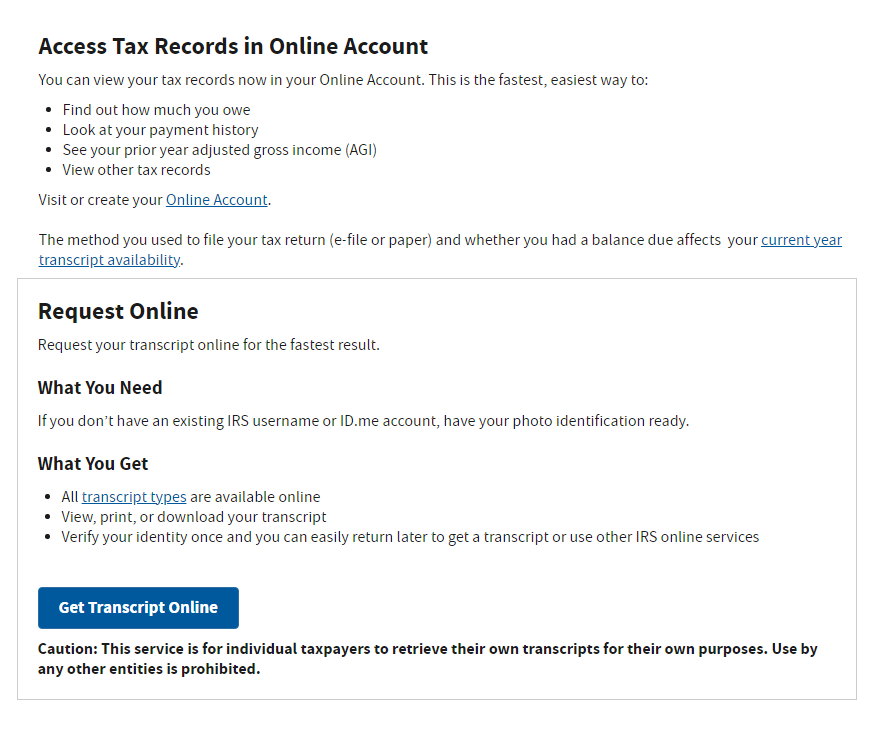
1.)Obtain FREE Access to Get Transcripts Online or by mail
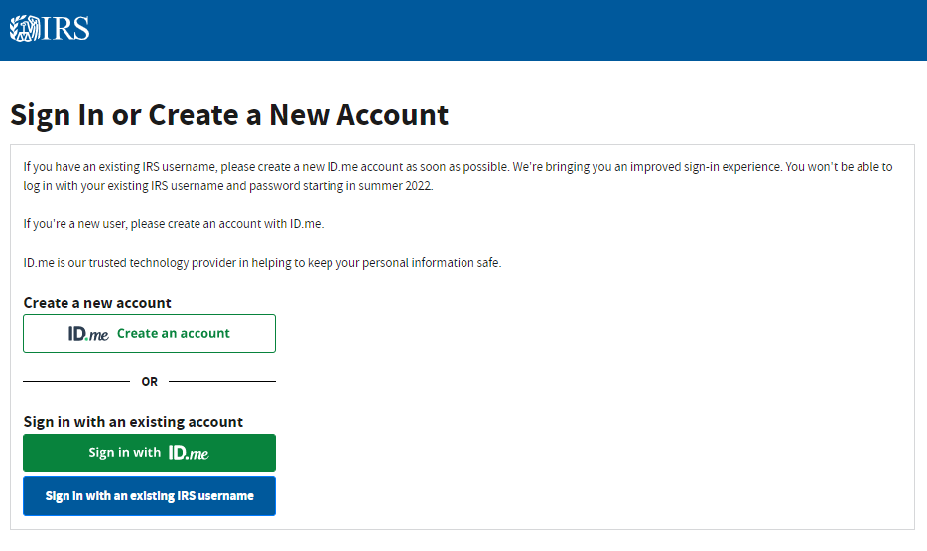
2.) Sign In or Create a New Account
ID.me Frequently Asked Questions
1. What is ID.me and why does the IRS use it?
ID.me is a third-party identity verification service that the IRS uses to confirm your identity when accessing online tax tools like Get Transcript Online, the Child Tax Credit Update Portal, and other IRS online services. The IRS partners with ID.me to protect taxpayers from identity theft and fraud by ensuring that only you can access your sensitive tax information.
2. Is ID.me safe and secure?
Yes, ID.me is a trusted identity verification provider that uses bank-level encryption to protect your personal information. The service is certified by the U.S. government and complies with federal security standards. ID.me is also used by other federal agencies, including the Social Security Administration, Department of Veterans Affairs, and multiple state unemployment offices. Your information is encrypted and ID.me does not share your data without your explicit consent.
3. What do I need to verify my identity with ID.me?
To verify your identity through ID.me, you’ll need:
- A valid government-issued photo ID (driver’s license, state ID, passport, or passport card)
- A smartphone or computer with a camera for the selfie verification
- Your Social Security Number
- An email address and phone number
- Approximately 15-20 minutes to complete the process
4. How long does the ID.me verification process take?
The automated verification process typically takes 10-15 minutes if everything goes smoothly. However, if you need to verify with a live video agent due to issues with automatic verification, wait times can vary from 30 minutes to several hours depending on demand. The IRS recommends having all your documentation ready before starting to minimize delays.
5. What if I can’t verify my identity automatically with ID.me?
If the automated system cannot verify your identity, you’ll be directed to a live video chat with an ID.me Trusted Referee. This agent will guide you through the verification process in real-time, review your documents via video, and help complete your identity verification. While this may take longer due to wait times, the video agent can resolve most verification issues that the automated system cannot.
6. Do I have to pay for ID.me verification?
No, using ID.me to verify your identity for IRS services is completely free. ID.me offers premium services for other purposes, but identity verification for accessing federal government services, including the IRS, does not cost anything.
7. Can I use ID.me without a smartphone?
Yes, you can complete ID.me verification on a computer with a webcam. However, having a smartphone can make the process easier, especially for taking clear photos of your ID and completing the selfie verification. If you don’t have access to either device with a camera, you may need to use alternative methods to access your IRS information, such as requesting transcripts by mail.
8. What if my ID.me account gets locked or I forget my password?
If you forget your password, click the “Forgot Password?” link on the ID.me login page and follow the prompts to reset it. If your account is locked due to multiple failed login attempts, you’ll need to wait 30 minutes before trying again or contact ID.me customer support for assistance. You can reach ID.me support through their help center at help.id.me or by using the in-app support chat.
9. Why is ID.me asking for a selfie or video of my face?
The selfie or video verification is a biometric security measure that confirms you are the actual person on the government-issued ID you’re using. This facial recognition technology helps prevent identity theft by ensuring someone isn’t using a stolen ID to access your tax information. The process compares your live selfie to the photo on your ID to verify they match.
10. Can I delete my ID.me account after I’m done using IRS services?
Yes, you can delete your ID.me account at any time through your account settings. However, keep in mind that if you delete your account, you’ll need to go through the entire verification process again if you want to access IRS online services in the future. Your ID.me account can be used across multiple government agencies, so maintaining it may be convenient for future use with other federal or state services.
Still Need Help?
If you’re experiencing issues with ID.me verification, you can:
- Visit the ID.me Help Center at help.id.me
- Contact ID.me support through their live chat feature
- Call the IRS at 800-908-9946 to request transcripts by mail as an alternative
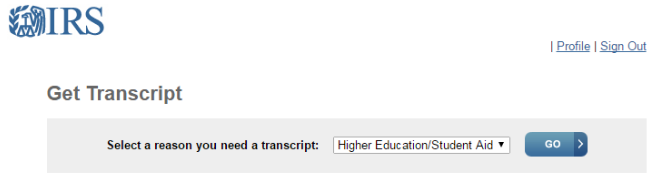
3.) Select the reason you need the Transcripts from the drop-down list and click Go. (We usually click Higher Education/Student Aid)
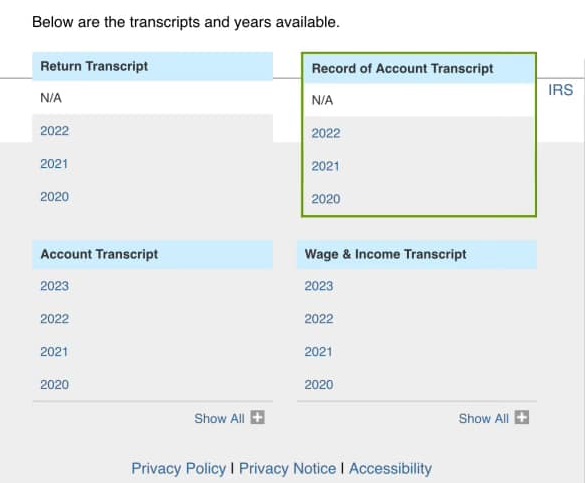
4.) In the Account Transcript box, click the year for the tax account transcript you want to download.
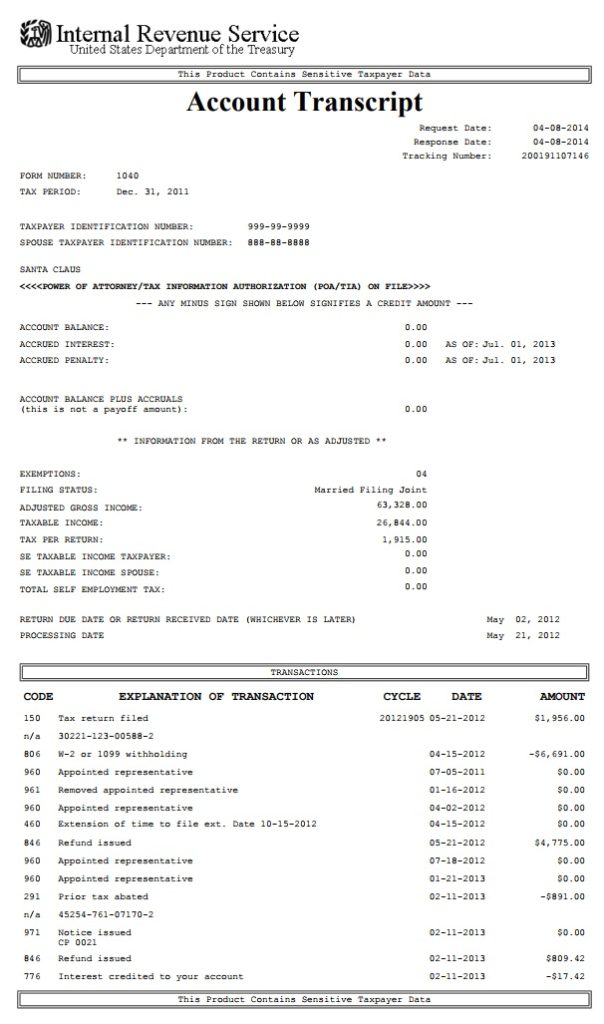
This is an example of an Account Transcript
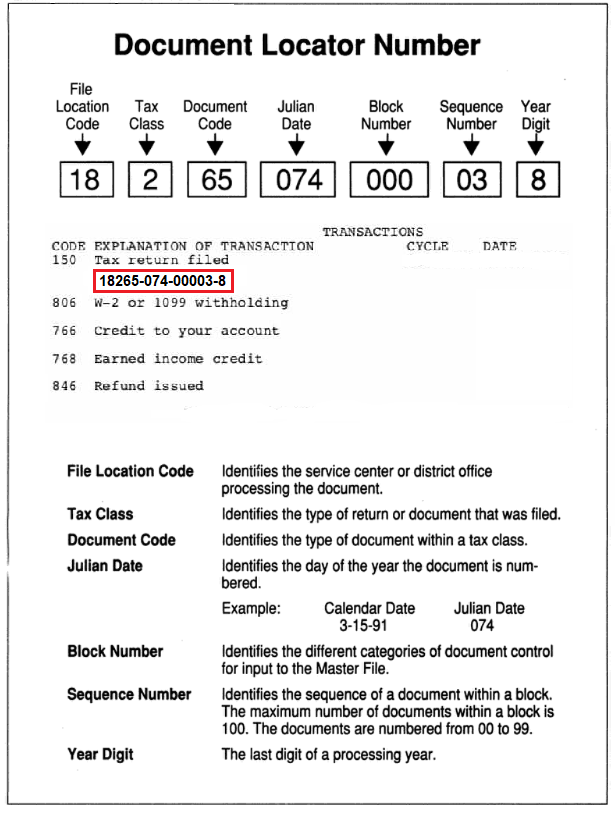
Document Locator Number
A Document Locator Number (DLN) is the IRS’s internal tracking ID for a specific return or document, and you’ll see it printed next to many transaction codes on a tax transcript.
Cycle Code Breakdown
What is the IRS Cycle Code?
Thecycle codeis an eight-digit code found on your account transcripts. The cycle code indicates the day your account was posted to the IRS Master File. This date indicates the 4 digits of the current cycle year, the two-digit IRS cycle week, and the two-digit processing day of the week.
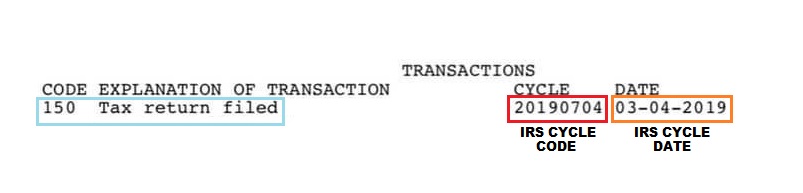
Let’s take your example cycle code:
20190704
Here’s how it breaks down:
- 2019 → Processing Year = 2019
- 07 → 7th Processing Week of 2019
- 04 → Wednesday (IRS Processing Day)
So this means:
Your tax return was processed Wednesday, February 13, 2019, during the 7th processing week of 2019.
2025 IRS Processing Cycles
Tax Transcript FAQs
What does the “As Of” Date mean on Tax Transcripts?
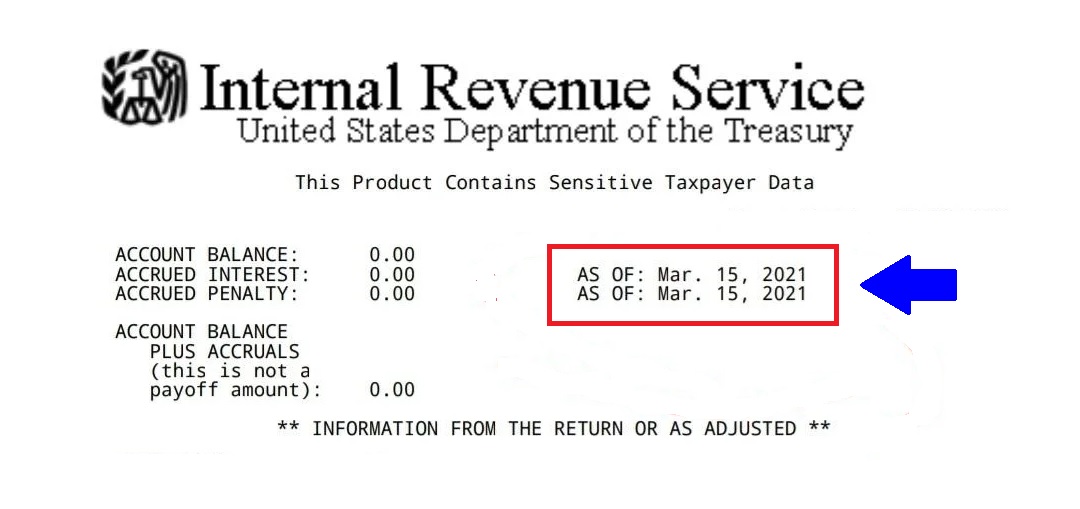
The“As Of” dateon a Tax Account Transcript is the date your penalties and interest are estimated to be calculated to determine if you have a balance due or a tax refund.
How do you find out when Transcripts Update?
Daily Accounts have Tuesday Transcript Updates and Weekly Accounts have Friday Transcript Updates. You can view our IRSupdate calendarshere and they will show you what days transcripts update for taxpayers.
How do you find out when Transcripts Update?
Daily Accounts have Tuesday Transcript Updates and Weekly Accounts have Friday Transcript Updates. You can view our IRSupdate calendarshere and they will show you what days transcripts update for taxpayers.
Account Transcript Overview
At the top right of the account, the transcript is the date of request, the date of response, and the tax period covered by the transcript.
Check the taxpayer identification numbers below, as well as the taxpayer name or names, to make sure they are accurate.
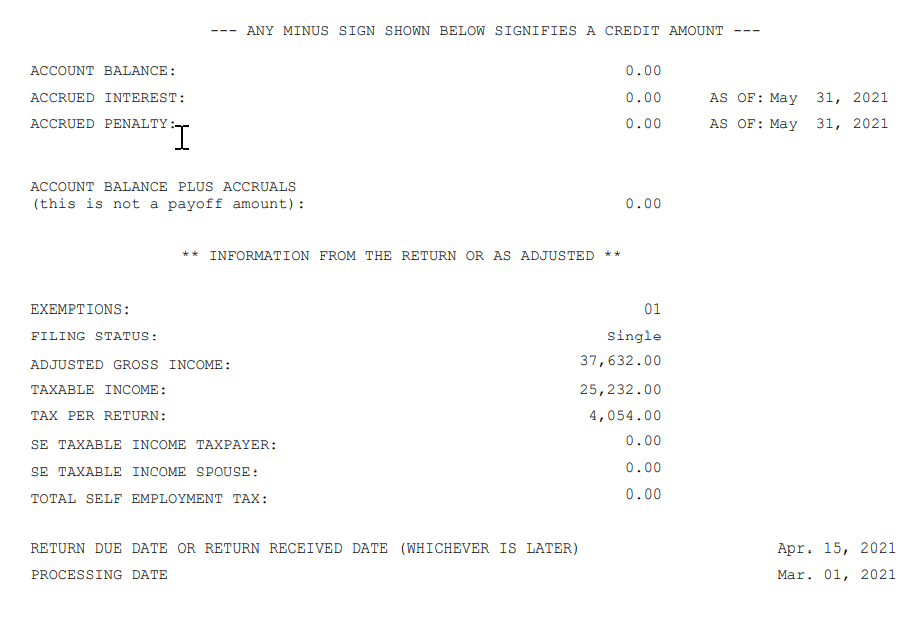
- The account transcript next lists the account balance, meaning the tax liability due and still outstanding. Following that are the interest and penalties, if any, levied on the balance and the most current date of these levies.
- The next section lists basic calculations from the return you submitted to the IRS. Included in that are the number of exemptions, the adjusted gross income, the taxable income, and the total tax liability. Following these calculations is the amount of self-employment tax owed by yourself and your spouse. These amounts may have been adjusted by you with an amendment to the return or by the IRS, according to its records and corrections.
- The transcript next gives the date on which the return was due or received, whichever was later.
- The processing date is when they are expected to process. This date could change if certain transactions post to your transaction codes that need more time.
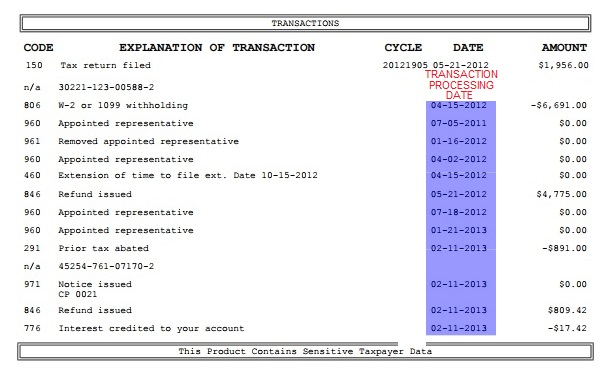
The final section lists transactions for the tax period, including the tax assessment amount and date, payments made and their dates, and any credits or refunds made and their date(s).
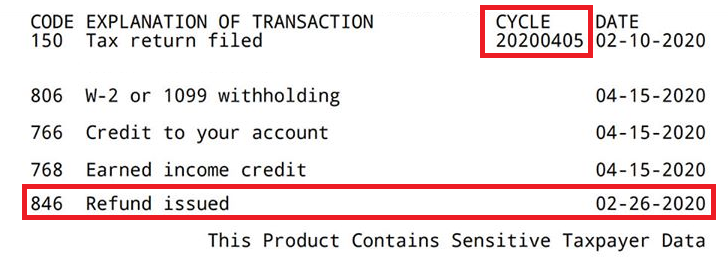
- Once your Account Transcript shows an846 Refund IssuedCode you will know the IRS has completed your tax return and you are getting your money on the date next to the 846 Refund Issued Code as highlighted below.
- The date next to the transaction means that the IRS has until this date to complete the work on this transaction.
Decoding Your IRS Account Transcript
Understanding your IRS account transcript can feel overwhelming at first, but learning to read it gives you valuable insight into your tax return status and any actions the IRS has taken on your account. Your transcript provides a complete history of your tax account, including return data, transactions, and changes made after your original filing.
What Information Does a Transcript Show?
Your IRS account transcript contains two main types of information:
Return Data:
- Filing status
- Adjusted Gross Income (AGI)
- Tax liability
- Credits and deductions claimed
- Federal taxes withheld
Account Activity:
- When your return was received and processed
- Payments made to the IRS
- Refunds issued
- Adjustments or corrections made after filing
- Penalties and interest assessed or abated
- IRS notices sent
- Current account balance
Understanding Transaction Codes
Transaction codes are three-digit numbers the IRS uses to identify specific actions or updates to your account. These codes create a chronological “history” of everything that happens with your return—from the moment it’s filed through processing, adjustments, refunds, and any subsequent changes.
Each transaction code appears with a date, showing you exactly when that action occurred. By understanding these codes, you can track your refund status, identify potential issues, and know when the IRS has made changes to your account.
Common IRS Transaction Codes Explained
Processing & Filing Codes
TC 150 – Return Filed & Tax Liability Assessed This is typically the first code you’ll see on your transcript. It confirms that the IRS has accepted your return and posted it to their master file for processing. The date next to this code shows when your return was officially recorded in the IRS system.
TC 460 – Extension of Time for Filing Indicates that you filed for an extension and received additional time to submit your tax return.
TC 977 – Amended Return Filed Shows that you filed an amended return (Form 1040-X) to correct information on your original return.
TC 976 – Duplicate Return Filed Appears when more than one return has been filed under your Social Security Number. This is often a red flag for identity theft, and you should contact the IRS immediately if you only filed one return.
Withholding & Credit Codes
TC 806 – W-2 or 1099 Withholding Reflects the total federal income taxes withheld by your employer or other payors during the tax year, as reported on your W-2s and 1099 forms.
TC 766 – Credit to Your Account Indicates a credit applied to your account. This could be from an overpayment, a refundable tax credit, or a credit transferred from another tax year. This is generally good news—it means money is being added to your account.
TC 768 – Earned Income Credit (EIC) Shows the amount of Earned Income Tax Credit you claimed and were approved to receive. This is a refundable credit for low-to-moderate income workers.
TC 836 – Refund Applied to Next Year Appears when you elected to apply all or part of your refund to next year’s estimated taxes instead of receiving it as a direct deposit or check.
Refund Codes
TC 846 – Refund Issued ✅ Great news! Your refund has been approved and sent. The date next to this code shows when your refund was issued. For direct deposits, you can typically expect the money in your account within 1-3 business days after this date. For paper checks, allow 5-7 business days for mail delivery.
TC 810 – Refund Freeze ⚠️ Your refund is currently on hold. The IRS has flagged something on your return that requires review before releasing your refund. You’ll typically receive a letter (often accompanied by TC 971) explaining why your refund is frozen and what steps you need to take.
TC 811 – Refund Release The freeze on your refund has been lifted, and processing will continue. This often follows a TC 810 after the IRS resolves the issue that caused the hold.
TC 820 – Refund Offset for IRS Debt Your refund was used to pay a previous tax debt you owed to the IRS. The amount shown indicates how much was taken from your refund.
TC 898 – Refund Offset for Non-IRS Federal Debt Your refund was intercepted by the Treasury Offset Program to pay non-IRS federal debts, such as defaulted student loans, unpaid child support, or other federal agency debts.
TC 840 – Manual Refund A refund was manually processed by an IRS employee rather than automatically generated by the system. This may occur after corrections or adjustments to your return.
Review & Examination Codes
TC 420 – Examination of Tax Return ⚠️ Your return has been selected for examination consideration. This doesn’t automatically mean you’re being audited, but it does mean the IRS is taking a closer look at your return. The return may or may not ultimately be audited.
TC 421 – Examination Request Closed The IRS has completed its review or examination of your return, and the case is now closed.
TC 424 – Examination Request Your return has been formally selected for examination or audit. You should expect to receive correspondence from the IRS requesting additional documentation.
TC 428 – Examination or Appeals Case Transfer Your examination or appeals case has been transferred to another IRS division or office for further review.
TC 922 – Review of Unreported Income The IRS is reviewing your return because they have records of income (from W-2s, 1099s, etc.) that doesn’t match what you reported on your return.
Hold & Freeze Codes
TC 570 – Additional Account Action Pending ⚠️ Your return is under review, and the IRS has placed a hold on your account while they verify information or resolve an issue. This is one of the most common “freeze” codes. Processing is temporarily paused, but this doesn’t necessarily mean there’s a problem—it could simply mean the IRS needs more time to review something.
TC 571 – Reversal of Account Hold The TC 570 hold has been released, and processing will resume. This is a good sign that the issue causing the delay has been resolved.
Assessment & Adjustment Codes
TC 290 – Additional Tax Assessed ⚠️ The IRS has determined you owe more taxes than you originally calculated and reported. The additional amount will be listed on this transaction line. This often results from IRS corrections or audits.
TC 291 – Abatement of Prior Tax Assessment A previously assessed tax liability has been reduced or removed. This is essentially a reversal or correction that works in your favor.
TC 300 – Additional Tax or Deficiency Assessment Additional tax has been assessed by the IRS Examination Division or Collection Division, typically following an audit or review.
Penalty & Interest Codes
TC 196 – Interest Assessment Interest has been charged to your account, typically because of underpayment or late payment of taxes.
TC 276 – Failure to Pay Tax Penalty ⚠️ A penalty has been imposed for failing to pay your taxes by the due date. The amount of the penalty will be shown on this line.
TC 776 – Interest Credit to Your Account Interest has been credited to your account. This typically occurs when the IRS owes you a refund and it was delayed, so they pay you interest on the amount.
Notice & Communication Codes
TC 971 – Miscellaneous Transaction / Notice Issued ⚠️ The IRS has sent you a notice or letter regarding your account. This is one of the most common codes and can mean many different things. Always check your mail or IRS online account for the actual notice to understand what action, if any, is required. TC 971 often appears alongside other codes like TC 570 to explain why your account is on hold.
TC 971 – Identity Theft Indicator When identity theft is suspected—either by the IRS or reported by you—your account will be marked with TC 971. This code may also appear if a duplicate return (TC 976) has been filed under your Social Security Number.
Collection & Legal Codes
TC 480 – Offer in Compromise Pending You’ve submitted an Offer in Compromise to settle your tax debt for less than the full amount owed, and the IRS is reviewing your offer.
TC 494 – Notice of Deficiency The IRS has issued a formal notice stating that you owe additional taxes. You have 90 days to either pay the amount or file a petition with the Tax Court to dispute it.
TC 520 – IRS Litigation Instituted The IRS has filed a lawsuit or taken legal action to collect unpaid taxes.
TC 530 – Currently Not Collectible The IRS has determined that your account is temporarily not collectible due to financial hardship. Collection efforts are suspended, but interest and penalties may still accrue.
TC 582 – Lien Indicator A federal tax lien has been filed against you due to unpaid taxes. This is a legal claim against your property and can significantly impact your credit.
Reversal & Correction Codes
TC 767 – Reduced or Removed Credit ⚠️ A credit previously applied to your account has been reduced or removed. This could be due to a rejected Treasury Offset Program (TOP) offset or a reversal of a refundable credit.
How to Use Your Transcript Codes
Step 1: Look for TC 150 to confirm your return was filed and posted to the IRS system.
Step 2: Check for TC 806 to verify your withholding matches what you reported.
Step 3: Look for credit codes (TC 766, TC 768) to see what credits have been applied.
Step 4: Watch for TC 846 to know when your refund has been issued.
Step 5: Be alert for hold codes (TC 570, TC 810) or notice codes (TC 971) that indicate issues requiring attention.
Step 6: Review any adjustment codes (TC 290, TC 291) to understand changes the IRS made to your return.
What to Do When You See Warning Codes
If you see any of these codes on your transcript, take action:
- TC 570, TC 810, TC 971: Check your mail for IRS notices explaining the hold or issue
- TC 420, TC 424: Gather documentation in case you’re selected for examination
- TC 290, TC 300: Review the assessment and determine if you agree or need to appeal
- TC 976: Contact the IRS immediately if you suspect identity theft
- TC 494: You have 90 days to respond—don’t delay
Need More Help?
The IRS Transaction Codes Pocket Guide provides a comprehensive master list of all transaction codes. You can download it from the IRS website or request it by calling 800-829-1040.
The abbreviations used under the heading “File” are as follows:
- Individual Master File (IMF) “I”,
- Business Master File (BMF) “B”,
- Employee Plan Master File (EPMF) “E”,
- IndividualRetirementAccount File (IRAF) “A “,
- Payer Master File (PMF) “P”.
Learning to read your transcript empowers you to stay informed about your tax account, catch potential issues early, and understand exactly what’s happening with your refund. While the codes may seem confusing at first, familiarizing yourself with the most common ones will help you navigate your tax transcript with confidence.
