If you’ve ever pulled your IRS Account Transcript and felt like you were staring at a wall of numbers—good news: the transcript is basically a timeline.

One of the most misunderstood parts is the “processing date.” People often think it’s a refund date. It’s not. But it is a useful marker that can help you understand what the IRS system is working on and what activity is likely to happen next.
This guide breaks it down in plain English.
What “processing dates” mean on an IRS account transcript
On an IRS account transcript, processing dates are system dates—the IRS computer’s way of showing when the account is being worked, posted, updated, or expected to complete normal processing steps.
In other words, processing dates help you turn “random codes” into a timeline:
- what has already posted
- what is pending
- what might be holding things up
The two main kinds of dates you’ll see
1) The Processing Date (near the top)
This usually appears near the top of the transcript, often close to the cycle code.

How to think about it:
- It’s a target week marker for the IRS system.
- It often falls on a Monday.
- It can loosely line up with the “normal” processing window for a clean e-filed return, but it is not a guaranteed refund date.
Key point:
If your processing date comes and goes and you still don’t see a refund code (846), you need to look lower on the transcript for clues.
2) Transaction Dates (in the transaction list)
These are the dates in the “DATE” column beside each transaction code (like 150, 846, 971).
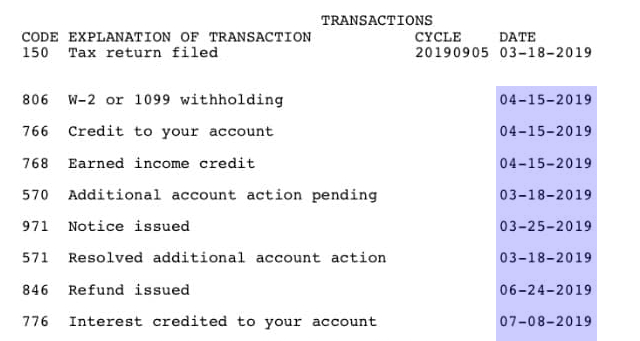
How to think about them:
- Each transaction date shows when that specific item posted (or is scheduled to post) to your account.
- Once something posts, those lines typically don’t change—new actions show up as new lines with new dates.
Key point:
The transaction list is where the real story is told.
What common transaction dates mean (and how to read the story)
Below are some of the most common codes taxpayers see, and what the DATE column usually represents.
Code 150 — “Tax return filed”
Date = when your return officially posted to the IRS master file.
This is the starting point for most timelines.
Code 806 — “W-2 or 1099 withholding”
Date = when withholding was matched and credited.
It often signals that wage/income data is being connected to your return record.
Codes 766 / 768 — “Credit to your account” / “Earned Income Credit”
Date = when refundable credits were applied to your account.
When these appear, it’s often a sign the IRS has finished key calculations on the refund/balance.
Code 846 — “Refund issued”
Date = the day the refund was released from the IRS (sent for direct deposit or sent for check issuance).
This is the date you use to estimate when money should hit.
Codes 570 / 971 — hold + notice (not on every transcript)
- 570 date = a hold/review action was placed
- 971 date = a notice was generated (often related)
Why the dates matter:
If 570/971 appear and the dates are on or after your processing date, that often explains why the refund didn’t move forward as expected.
Code 977 — “Amended return filed”
Date = when your amended return (1040-X) was accepted into processing.
This starts a separate timeline that is typically much longer than an original return.
Codes 290 / 291 — “Additional tax assessed” / “Tax decreased”
Date = when the IRS finalized a change that increases or decreases tax.
These are often paired with a 971 notice date explaining the adjustment.
Code 776 — “Interest credited to your account”
Date = when interest was added due to processing time on an overpayment.
This is commonly seen when refunds are delayed long enough to trigger interest, and it may line up with a later 846 tied to an adjustment.
Step-by-step: How to use transcript dates to understand your refund
This is the simple “teach it every time” method you can reuse across your website, social posts, and videos.
Step 1: Locate the cycle code + processing date
Tell taxpayers:
- Processing date = the IRS computer’s target week / system marker
- Not a deposit date
- Helpful for context, but the transaction list matters more
Step 2: Read the transaction list like a timeline
Start from the top of the transaction section:
- Find Code 150 and note the 150 date (official posting start)
- Look for 806 (withholding credited)
- Look for 766/768 (credits applied)
- Look for 846 (refund released)
If you have 846: you’re usually in the “refund sent” stage.
Step 3: Spot delays and holds
If there’s a processing date but no 846, look for:
- 570 (hold/review)
- 971 (notice issued)
Teach this clearly:
- A 570/971 doesn’t automatically mean “bad,” but it often means the IRS needs time, review, or a response.
Step 4: Track amended returns and later changes
If you see 977, you’re on the amended-return timeline:
- 977 date = amended return entered processing
- 290/291 + 971 = IRS finalized changes + notice generated
- 846 (later) = any refund after the adjustment was released
Step 5: Connect dates to real-world expectations
Use practical expectations, not hype:
- Direct deposit commonly shows within a few days after 846
- Paper checks can take longer due to mailing
- If it’s been 21+ days after the 150 date and there’s still no 846 (and no new codes explaining why), it’s reasonable to check Where’s My Refund and review your IRS account for messages/notices
A simple example explanation you can quote anywhere
“Think of your IRS transcript as a timeline. The processing date at the top is the IRS computer’s target week, but the real story is in the transaction dates. The 150 date shows when your return officially posted, the 766/768 dates show when credits were applied, and the 846 date shows when your refund was actually sent. If you see later dates with codes like 570, 971, 290, or 977, that usually means a review or adjustment happened and explains why your refund is taking longer. Walk the transcript in date order and it becomes a step-by-step record of what the IRS has done.”
Quick FAQ
Is the processing date my refund date?
No. The refund date is tied to Code 846 (Refund issued).
Do transaction dates change?
Typically, posted transactions remain the same. New actions appear as new lines.
What if I have a processing date but no 846?
Check for 570/971 or other codes that indicate review, a notice, or an adjustment.
